
Complete Passport Size Photo Size Guide: MM, CM, Inch, Pixels & Ratio
Introduction: Why Document Dimensions and Aspect Ratios Matter
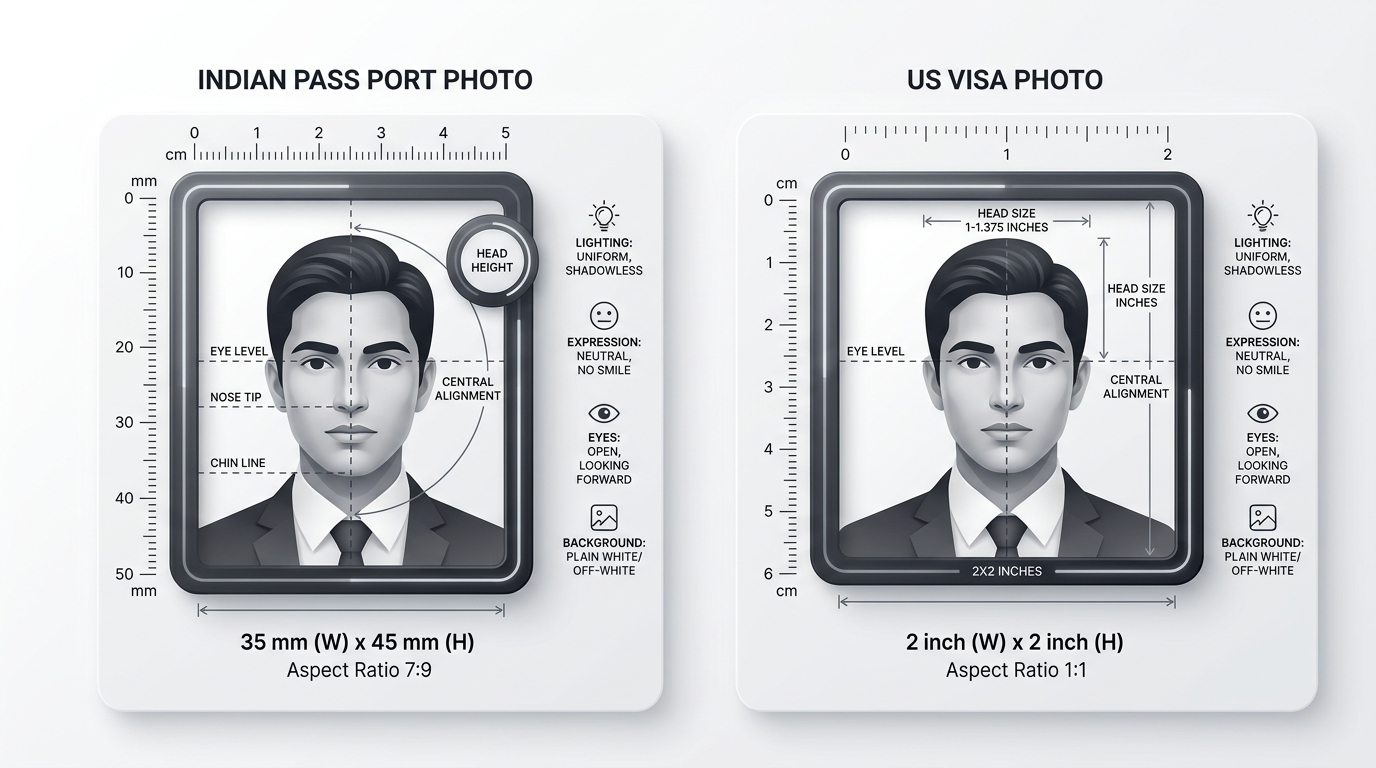
Whether you are renewing your Indian Passport, enrolling for an Aadhaar Card, applying for a US Visa (DS-160), or submitting an online exam form for SSC CGL or UPSC, having the exact passport size photo size and correct passport size photo ratio is mandatory.
Using our free passport size photo maker, you can easily make passport size photo online free, check the official passport size photo size in cm (3.5×4.5 cm / 2.5×3.5 cm), execute a clean passport size photo background change to pure studio white, and utilize our smart passport size photo converter to export print-ready 300 DPI files or compress under 20KB–50KB.
A digital application portal does not judge your passport size photo solely by its visual quality; automated computer vision algorithms scan the image’s geometric proportions, pixel matrix, file weight, and background uniformity. If the photograph’s passport size photo ratio does not match the portal’s strict bounding box, the image is automatically compressed or stretched horizontally, distorting your natural facial features and triggering immediate biometric rejection.
In this comprehensive guide, we break down every standard measurement unit—Millimeters (mm), Centimeters (cm), Inches (in), Pixels (px), and the fundamental Mathematical Aspect Ratio—so your photos are accepted on the first attempt.
1. Indian Passport Photo Size (35 × 45 mm / 7:9 Ratio)
The Ministry of External Affairs (MEA) and Passport Seva Kendra (PSK) follow the International Civil Aviation Organization (ICAO Doc 9303) biometric standard for all Indian passports.
| Specification | Official Indian Passport Standard |
|---|---|
| Physical Dimensions in MM | 35 mm (Width) × 45 mm (Height) |
| Physical Dimensions in CM | 3.5 cm (Width) × 4.5 cm (Height) |
| Physical Dimensions in Inches | 1.38 inches × 1.77 inches |
| Mathematical Aspect Ratio | 7 : 9 (0.778 Decimal Proportion) |
| Digital Pixel Grid @ 300 DPI | 413 × 531 Pixels (Print Ready) |
| Digital Pixel Grid @ 600 DPI | 827 × 1063 Pixels (High-Definition Biometric) |
| Facial Coverage Rule | 70% to 80% (31 mm to 36 mm from chin to top of hair) |
| Mandatory Background Color | Plain White or Off-White (No shadows) |
| Target Digital File Size | 20 KB to 200 KB (JPEG / JPG format) |
Understanding the 7:9 Aspect Ratio
When 35 mm is divided by 45 mm and simplified by their Greatest Common Divisor (GCD = 5):
Aspect Ratio Calculation: (35 ÷ 5) / (45 ÷ 5) = 7 / 9 (Aspect Ratio: 7:9, Decimal: 0.778)
This exact 7:9 ratio means that for every 7 units of width, there must be exactly 9 units of height. Using our free Passport Photo Maker Online, the cropping box automatically locks to 7:9 to prevent any horizontal distortion.
2. United States Visa & OCI Card Size (2 × 2 Inch / 1:1 Ratio)
The United States Department of State (for Non-Immigrant DS-160 and Immigrant Visas) and Overseas Citizenship of India (OCI) registration demand an exact square format:
| Specification | US Visa & OCI Card Standard |
|---|---|
| Physical Dimensions in Inches | 2.0 × 2.0 Inches (Exact Square) |
| Physical Dimensions in MM | 51 mm × 51 mm (or 50.8 × 50.8 mm) |
| Physical Dimensions in CM | 5.08 cm × 5.08 cm (5.1 × 5.1 cm) |
| Mathematical Aspect Ratio | 1 : 1 (1.000 Decimal Proportion) |
| Digital Pixel Grid @ 300 DPI | 600 × 600 Pixels (Mandatory DS-160 portal size) |
| Digital Pixel Grid @ 600 DPI | 1200 × 1200 Pixels (High Resolution) |
| Facial Coverage Rule | 50% to 69% (1 inch to 1 3/8 inches from chin to crown) |
| Background Color | Strict Plain White or Off-White |
| Target Digital File Size | Under 240 KB (Minimum 600×600 px) |
3. PAN Card Dimensions (NSDL / UTIITSL)
Income Tax Permanent Account Number (PAN) applications follow two distinct rules depending on whether you are submitting a physical paper form or uploading a digital photo online:
- Physical Form 49A / 49AA: Requires a 2.5 cm × 3.5 cm (25 × 35 mm) photograph, which represents a 5:7 aspect ratio (295 × 413 px at 300 DPI).
- NSDL / Protean & UTIITSL Online Upload Portals: Require an exact digital upload dimension of 213 × 213 Pixels at 200 DPI resolution, with a strict file size between 10 KB and 50 KB.
4. Competitive Exam Portals in India (SSC, UPSC, Railway RRB)
Online recruitment portals frequently enforce both specific pixel boundaries and strict maximum file weight limits:
Staff Selection Commission (SSC CGL / CHSL / MTS)
- Physical Dimension Equivalent: 3.5 × 4.5 cm (35 × 45 mm / 7:9 ratio).
- Portal Digital Box Requirement: 200 × 230 Pixels.
- File Weight: 20 KB to 50 KB (JPEG format).
- Compliance: Live camera capture or uploaded photo must have full frontal visibility with ears visible and neutral lighting.
Union Public Service Commission (UPSC CSE / NDA / CDS)
- Digital Pixel Range: Minimum 350 × 350 Pixels to Maximum 1000 × 1000 Pixels.
- Aspect Ratio: 1:1 to 7:9.
- File Weight Limit: 20 KB to 300 KB.
- Face Visibility: 3/4th of the photograph must clearly display the face.
Railway Recruitment Board (RRB ALP / NTPC / Group D)
- Digital Upload Box: 240 × 320 Pixels (35 × 45 mm standard).
- File Weight: 30 KB to 70 KB.
5. International Visa Photo Dimensions Chart
If you are traveling abroad, refer to this quick reference guide for popular destination countries:
| Destination Country | Dimensions (MM) | Dimensions (CM) | Aspect Ratio | Background Requirement |
|---|---|---|---|---|
| United Kingdom (UKVI) | 35 × 45 mm | 3.5 × 4.5 cm | 7 : 9 | Light Grey or Cream |
| Schengen Area (29 EU Nations) | 35 × 45 mm | 3.5 × 4.5 cm | 7 : 9 | Light Grey / Neutral |
| Canada (IRCC Visa & PR) | 50 × 70 mm | 5.0 × 7.0 cm | 5 : 7 | Pure White or Light |
| Australia | 35 × 45 mm | 3.5 × 4.5 cm | 7 : 9 | Plain White / Light Grey |
| Singapore (ICA) | 35 × 45 mm | 3.5 × 4.5 cm | 7 : 9 | Pure White (400 × 514 px) |
| Dubai & UAE (GDRFA) | 40 × 60 mm | 4.0 × 6.0 cm | 2 : 3 | Plain White |
6. How to Calculate Pixels from Physical Dimensions (DPI Formula)
When converting physical measurements (millimeters or inches) to digital screen pixels, use the standard DPI formula:
Pixel Calculation Formula: Pixels = (Dimension in mm ÷ 25.4) × DPI
For example, to calculate the height in pixels for an Indian Passport (45 mm) at 300 DPI:
Height in Pixels: (45 ÷ 25.4) × 300 = 1.7716 × 300 ≈ 531 Pixels
Using our built-in Passport Photo Ratio Calculator, you can switch effortlessly between MM, CM, Inches, and Pixels at 200, 300, or 600 DPI without doing manual calculations.
7. How to Resize and Reduce Image Size in KB
Most government portals will reject images if the file size is either too large (above 50KB or 100KB) or too small (under 10KB).
To ensure acceptance:
- Open the Passport Photo Maker Online.
- Select your document preset (e.g. Indian Passport 7:9 or SSC Form).
- Use the Output Quality & File Size (KB) slider to tune the compression.
- Watch the live estimated size counter: set it to ~20 KB to 50 KB for exam forms or ~80 KB to 150 KB for high-resolution visa portals.
- Download your JPEG with full resolution and exact aspect ratio intact!
Summary Checklist Before Uploading
- Correct Ratio: 7:9 for India/UK/Schengen or 1:1 for USA.
- Clear Background: Plain white or neutral light grey with no shadows.
- Head Position: Straight facing front, eyes looking into lens, neutral expression.
- File Size: Compressed to recommended KB limits (20KB–50KB).
- Resolution: Minimum 300 DPI for crystal clear biometric printing.
Try the Free Passport Photo Ratio Tool
Check dimensions, calculate pixels, and crop your photo instantly:
Passport Photo Ratio Calculator & Sizing Tool
Calculate exact simplified aspect ratios, millimeter to pixel conversions, and DPI resolutions.
Mandatory official format for Passport Seva Kendra (PSK) & Post Office Passport Seva Kendra (POPSK) applications.
35.0mm × 45.0mm (3.50 × 4.50 cm) simplifies to an exact aspect ratio of 7:9.