
Driving Licence & Voter ID Photo Size, Ratio & Upload Rules in India
ड्राइविंग लाइसेंस (Parivahan Sarathi) और वोटर आईडी फोटो एवं सिग्नेचर साइज नियम
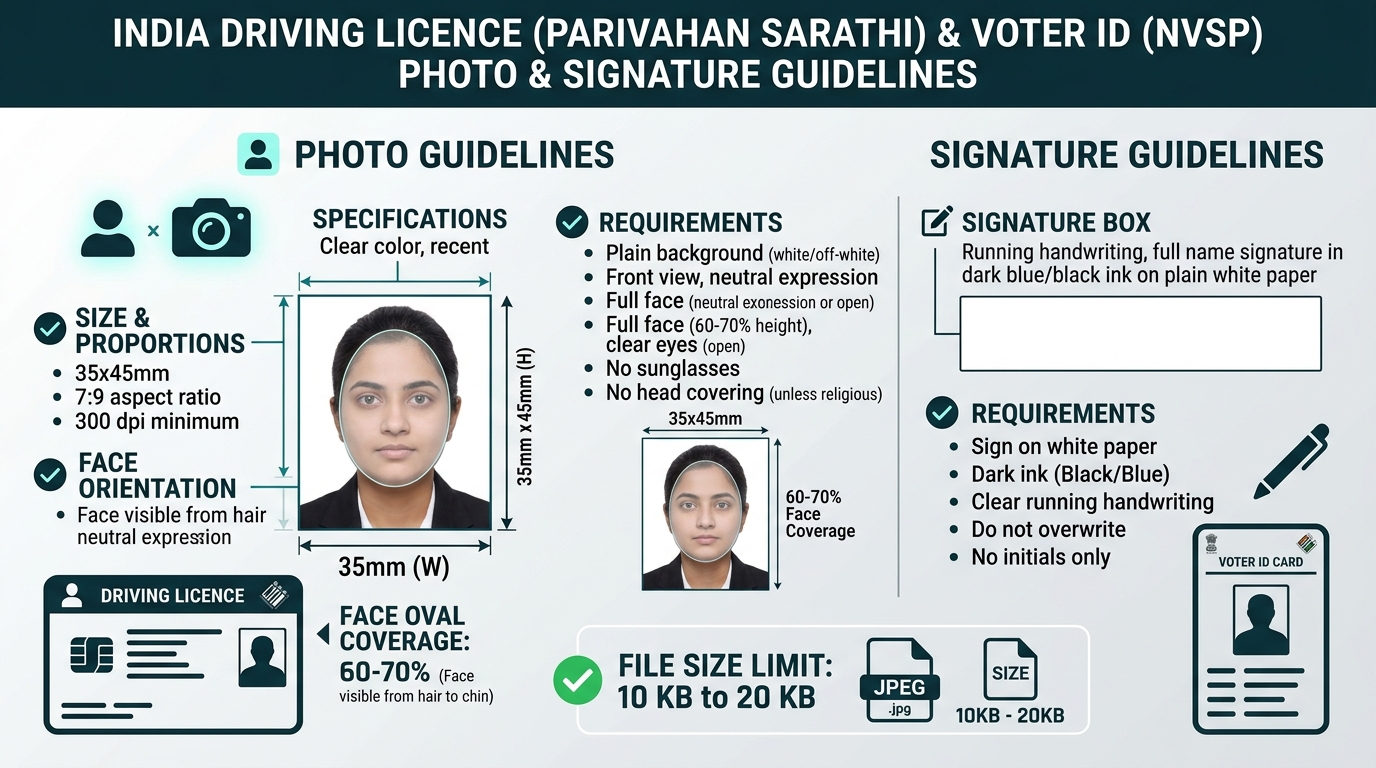
When applying for a Learner’s Licence (LL), Permanent Driving Licence (DL), Renewal, or an Election Commission of India (ECI) Voter Identity Card online, one of the most frustrating obstacles candidates face is the dreaded portal error: “File size must be between 10 KB and 20 KB” or “Invalid Image Aspect Ratio”.
Both the Ministry of Road Transport and Highways (MoRTH Parivahan Sarathi) and the Election Commission of India (ECI Voters’ Services Portal / NVSP) handle millions of citizen transactions every month. To prevent server congestion and maintain biometric verification standards, they enforce strict photographic, signature, and compression criteria.
In this definitive guide, we break down the exact physical dimensions, pixel mappings, aspect ratios, file size limits, common rejection reasons, and step-by-step instructions to upload your Driving Licence and Voter ID photo and signature flawlessly on the first attempt.
1. Official Photo & Signature Specifications at a Glance
Before scanning or taking a picture with your smartphone, familiarize yourself with the official technical criteria mandated by MoRTH and ECI:
| Parameter | Parivahan Sarathi (Driving Licence) | ECI Voter ID Card (Form 6 & 8) |
|---|---|---|
| Physical Dimensions | 35 × 45 mm (3.5 × 4.5 cm / 1.38 × 1.77 in) | 35 × 45 mm (3.5 × 4.5 cm) |
| Mathematical Aspect Ratio | 7 : 9 (0.778) | 7 : 9 (0.778) |
| Digital Resolution (300 DPI) | 413 × 531 pixels | 413 × 531 pixels |
| Portal Standard Resolution | 420 × 525 pixels | 350 × 450 pixels |
| Allowed File Size Range | 10.0 KB to 20.0 KB (Strict Maximum Limit) | 20 KB to 100 KB (Max allowed: 2 MB) |
| Accepted Image Format | JPEG / JPG only | JPEG / JPG / PNG |
| Background Color | Plain White or Light Off-White | Plain White (Neutral) |
| Facial Coverage (Head-to-Chin) | 60% to 70% of total vertical frame | 70% to 80% of frame |
| Signature Box Size | 35 × 15 mm or 60 × 20 mm | Form 6 signature field |
| Signature File Size | 10.0 KB to 20.0 KB | Under 100 KB |
You can automatically crop, center, and compress your image to these exact parameters using our free Passport Photo Maker Online or verify dimension conversions with the Universal Ratio Calculator.
2. Parivahan Sarathi Driving Licence Photo Upload Rules (MoRTH)
The Parivahan Sarathi portal (sarathi.parivahan.gov.in) processes applications across all Indian states and Union Territories—including Delhi, Uttar Pradesh, Maharashtra, Karnataka, Tamil Nadu, Bihar, and Rajasthan.
Strict 10 KB to 20 KB File Size Ceiling
Unlike private portals that allow multiple megabytes, Sarathi has a rigid binary file size check:
- Minimum: 10.0 KB
- Maximum: 20.0 KB
If your image is 9.8 KB, it will be rejected as undersized. If it is 20.1 KB, the portal will immediately return an error: “Uploaded Photo file size is greater than 20 KB”. You must ensure the exported file sits safely within the 12 KB to 18 KB sweet spot.
7:9 Aspect Ratio Locking
The standard Driving Licence card issued by Regional Transport Offices (RTO) utilizes a microchip smart-card layout where the photo box is calibrated to 35mm width by 45mm height (7:9 ratio). Uploading a wide 16:9 mobile photo or an Instagram 1:1 square photo will cause vertical or horizontal face stretching on the printed physical plastic card.
Background and Lighting Requirements
- Background Color: A plain, uniform white background is officially required. Light off-white or very light grey is accepted in most RTO jurisdictions. Dark backgrounds (blue, red, outdoor scenery) will lead to scrutiny and potential RTO officer rejection during document scrutiny.
- Even Lighting: Ensure there are no harsh flash reflections on the cheeks or shadows behind the ears. If taking a picture at home against a white wall, stand 1 foot away from the wall to eliminate cast drop-shadows.
Head Covering and Spectacles
- Spectacles: Applicants who wear prescription spectacles for driving may keep them on, provided there is no glare or flash reflection on the lenses and the frames do not obscure any part of the eyes. Dark glasses or sunglasses are strictly prohibited.
- Religious Headwear: Turbans, Hijabs, and religious headgear are permitted, provided the full face from the top of the forehead to the bottom of the chin, including both cheek contours, remains unobstructed.
3. Driving Licence Signature Upload Specifications
In addition to the photograph, Sarathi requires candidates to upload an authorized digital signature:
- Ink Color: Must be signed using a black or dark blue ink pen (gel or ballpoint). Light inks, red pens, or pencil signatures are rejected.
- Paper Quality: Must be signed on clean, unlined white paper. Do not use ruled notebook paper or stamp-pad paper.
- Dimensions & Crop: A horizontal rectangular crop with an approximate 3:1 or 2.5:1 ratio (6.0 × 2.0 cm or 5.0 × 2.0 cm).
- Signature File Size: Must strictly measure between 10 KB and 20 KB in JPEG format.
- Running Handwriting Only: The signature must represent your normal running handwriting. Writing your name in block/capital letters is considered invalid.
[!TIP] If you are also preparing for government recruitment forms, our newly launched SSC JE & RRB JE Signature Resizer incorporates an automated high-contrast black-and-white ink filter specifically designed to strip phone camera shadows from signatures.
4. Election Commission of India (ECI) Voter ID Photo Guidelines
When submitting Form 6 (New Voter Registration), Form 8 (Correction of Entries / Shifting of Residence), or updating your photographic record on the ECI Voters’ Services Portal:
Dimensions and Framing
- Standard Size: 3.5 × 4.5 cm (35 × 45 mm).
- Facial Coverage: 70% to 80% of the picture must be occupied by the face, centered vertically between the crown of the head and the chin.
- Expression: A neutral, forward-facing expression with mouth closed and eyes open, looking directly into the camera lens.
Color and Clarity
- The photo must be a sharp color photograph taken within the last 6 months.
- Black-and-white photographs, selfies taken at extreme high/low angles, or screenshots of Aadhaar cards are frequently rejected by the Electoral Registration Officer (ERO).
5. Step-by-Step: How to Resize and Compress for Sarathi & Voter ID
Follow these four steps to generate a 100% compliant photo without installing heavy desktop software like Photoshop:
flowchart LR
    A[Take Photo Against White Wall] --> B[Upload to Photo Maker]
    B --> C[Lock 7:9 Ratio & Clean BG]
    C --> D[Target 10-20 KB Compression]
    D --> E[Upload to Sarathi / Voter Portal]
Step 1: Capture the Raw Photo
- Stand approximately 1.5 to 2 meters away from a plain light-colored wall in daylight.
- Have a family member or friend take a portrait shot at eye level using your phone’s rear camera. Avoid wide-angle front selfies which distort nose-to-ear proportions.
Step 2: Crop to Exact 7:9 Aspect Ratio
- Open the Passport Photo Maker Online.
- Upload your captured image. The interactive Studio Dashboard opens immediately.
- Choose the “Driving Licence (Parivahan Sarathi)” preset or select the 7:9 ratio tab.
- Center your face within the biometric oval guide.
Step 3: Clean the Background
- Open the “🎨 Adjust” tab.
- Toggle the White BG Cleaner if your wall has a slight off-white tint. Adjust the tolerance slider until the background is pure white without clipping hair strands.
Step 4: Lock 10–20 KB File Size and Download
- Open the “⚖️ KB Size” tab.
- Choose “10 KB – 20 KB” mode. Our browser engine automatically balances quality and compression so your final JPEG lands precisely around 14 KB to 17 KB.
- Click “Download Single Photo”. You can immediately upload this file to the Sarathi or NVSP portal without any rejection errors!
6. Common Upload Errors and How to Resolve Them
Error 1: “Uploaded file size exceeds 20 KB”
- Cause: Your smartphone took a 3MB to 5MB high-resolution photo.
- Fix: In our Photo Maker Studio, adjust the compression slider to 15 KB before downloading.
Error 2: “Photo dimensions are not in proper proportion”
- Cause: The image was cropped as an Instagram square (1:1) or panoramic shot (16:9).
- Fix: Use the locked 7:9 ratio (35×45 mm) preset to ensure the correct width-to-height proportion.
Error 3: “Blurred or Unclear Image”
- Cause: Over-compressing a low-resolution thumbnail below 10 KB or capturing with motion blur.
- Fix: Always start with a crisp, well-lit photo and export at 300 DPI using our high-density canvas engine.
7. Useful Internal Tools & Size References
- Universal Ratio Tool: Check pixel dimensions for any document with our Ratio Calculator & Sizer.
- Physical Millimeter Guide: Learn how 35×45mm translates to centimeters, inches, and pixels at 3.5 × 4.5 cm Photo Guide.
- PAN Card Requirements: Applying for income tax documents? Read our dedicated PAN Card 213×213 Pixel Guide.
- Competitive Exam Signatures: Need official exam signature formatting? Visit the SSC JE Signature Resizer (10–20 KB).
- Home Printing: Print 12 to 16 passport photos on a single sheet using our A4 Print Sheet Maker.
Try the Free Passport Photo Ratio Tool
Check dimensions, calculate pixels, and crop your photo instantly:
Passport Photo Ratio Calculator & Sizing Tool
Calculate exact simplified aspect ratios, millimeter to pixel conversions, and DPI resolutions.
Mandatory official format for Passport Seva Kendra (PSK) & Post Office Passport Seva Kendra (POPSK) applications.
35.0mm × 45.0mm (3.50 × 4.50 cm) simplifies to an exact aspect ratio of 7:9.