
Passport Size Photo in CM, Inch & Pixels: Complete Conversion Chart
पासपोर्ट साइज फोटो: सेंटीमीटर (CM), इंच और पिक्सल (Pixels) कन्वर्जन चार्ट
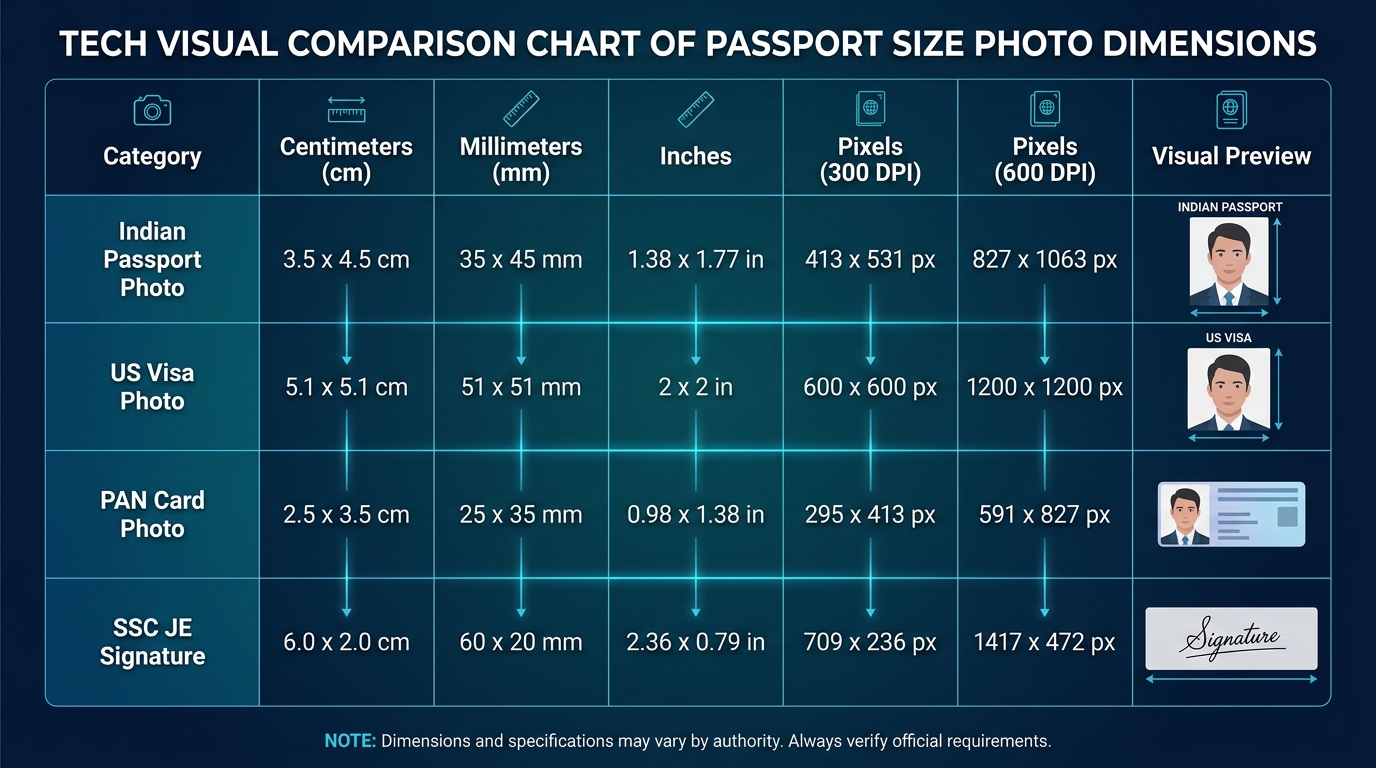
When preparing passport photos, visa applications, government recruitment forms, or national identity documents, you will inevitably encounter instructions specified in completely different measurement units:
- An Indian Passport Seva Kendra (PSK) notification asks for 35 × 45 mm.
- A state government form requests 3.5 × 4.5 cm.
- A US Visa (DS-160) or OCI portal asks for 2 × 2 inches or 600 × 600 pixels.
- An SSC recruitment portal demands 200 × 230 pixels and signatures of 6.0 × 2.0 cm.
- An Indian PAN card portal requires 213 × 213 pixels at 200 DPI.
How do physical units like centimeters, millimeters, and inches translate into digital screen pixels? Why does a 35 × 45 mm photo become 413 × 531 pixels at 300 DPI, and what is the underlying mathematics?
In this comprehensive technical guide, we provide the complete conversion formulas, a master reference chart across all DPI levels, mathematical aspect ratio derivations, and step-by-step examples so you can convert any photo dimension with absolute mathematical precision.
1. Master Dimension & Pixel Conversion Matrix
The table below provides exact physical-to-digital mappings across the most widely used document standards in India and worldwide:
| Document Standard | Millimeters (mm) | Centimeters (cm) | Inches (in) | Mathematical Aspect Ratio | 300 DPI (Standard Studio Print) | 600 DPI (Biometric High-Density) | Web / Screen (96 DPI) |
|---|---|---|---|---|---|---|---|
| Indian Passport (PSK Standard) | 35 × 45 mm | 3.5 × 4.5 cm | 1.38 × 1.77 in | 7 : 9 (0.778) | 413 × 531 px | 827 × 1063 px | 132 × 170 px |
| Aadhaar Card (UIDAI Portal) | 35 × 45 mm | 3.5 × 4.5 cm | 1.38 × 1.77 in | 7 : 9 (0.778) | 413 × 531 px | 827 × 1063 px | 132 × 170 px |
| US Visa (DS-160) / OCI Card | 51 × 51 mm | 5.08 × 5.08 cm | 2.0 × 2.0 in | 1 : 1 (1.000) | 600 × 600 px | 1200 × 1200 px | 192 × 192 px |
| PAN Card (Form 49A Physical) | 25 × 35 mm | 2.5 × 3.5 cm | 0.98 × 1.38 in | 5 : 7 (0.714) | 295 × 413 px | 591 × 827 px | 94 × 132 px |
| PAN Card (Protean / NSDL Web) | 27 × 27 mm | 2.7 × 2.7 cm | 1.06 × 1.06 in | 1 : 1 (1.000) | 213 × 213 px (at 200 DPI) | 639 × 639 px | 102 × 102 px |
| SSC JE 2026 Signature | 60 × 20 mm | 6.0 × 2.0 cm | 2.36 × 0.79 in | 3 : 1 (3.000) | 709 × 236 px | 1417 × 472 px | 227 × 76 px |
| Schengen Visa (Europe - 29 States) | 35 × 45 mm | 3.5 × 4.5 cm | 1.38 × 1.77 in | 7 : 9 (0.778) | 413 × 531 px | 827 × 1063 px | 132 × 170 px |
| Canada Visa / PR / Express Entry | 50 × 70 mm | 5.0 × 7.0 cm | 1.97 × 2.76 in | 5 : 7 (0.714) | 591 × 827 px | 1181 × 1654 px | 189 × 265 px |
| Dubai & UAE Visa (ICP / GDRFA) | 40 × 60 mm | 4.0 × 6.0 cm | 1.57 × 2.36 in | 2 : 3 (0.667) | 472 × 709 px | 945 × 1417 px | 151 × 227 px |
| UK Visa & Immigration (UKVI) | 35 × 45 mm | 3.5 × 4.5 cm | 1.38 × 1.77 in | 7 : 9 (0.778) | 413 × 531 px | 827 × 1063 px | 132 × 170 px |
Convert any physical measurement automatically into exact pixels with our Passport Size Photo Multi-Unit Converter.
2. Understanding DPI: Dots Per Inch vs. Pixels Per Inch (PPI)
The single most common source of confusion in digital photography is DPI (Dots Per Inch):
- A digital camera sensor captures raw pixels (e.g. 4000 × 3000 pixels). Pixels on their own have no physical size in centimeters or inches until assigned a density rating.
- DPI defines the density of pixels packed into one physical linear inch (2.54 cm).
Why 300 DPI is the Universal Standard
Human visual acuity cannot discern individual ink dots printed at 300 DPI or higher from a normal reading distance of 12 inches (30 cm). Consequently:
- 300 DPI is the official standard for commercial photo lab prints, passport photo kiosks, and photo ID smart cards.
- 600 DPI is used by border control biometric scanners (such as ICAO Doc 9303 e-Passports) to capture fine iris textures and skin pores.
- 96 DPI or 72 DPI is standard for desktop computer monitors and web viewing.
3. The Mathematical Conversion Formulas
To convert between millimeters, centimeters, inches, and pixels, use these universal mathematical equations:
Formula A: Converting Inches to Pixels
Formula: Pixels = Dimension in Inches × DPI
- Example: US Visa Photo (2.0 × 2.0 inches at 300 DPI)
- Width = 2.0 × 300 = 600 pixels
- Height = 2.0 × 300 = 600 pixels
- Result: 600 × 600 pixels (Exact DS-160 upload requirement).
Formula B: Converting Millimeters (mm) to Pixels
Since 1 inch equals exactly 25.4 millimeters:
Formula: Pixels = (Dimension in mm ÷ 25.4) × DPI
- Example: Indian Passport Photo (35 × 45 mm at 300 DPI)
- Width = (35 ÷ 25.4) × 300 = 1.37795 × 300 = 413.38 ≈ 413 pixels
- Height = (45 ÷ 25.4) × 300 = 1.77165 × 300 = 531.49 ≈ 531 pixels
- Result: 413 × 531 pixels at 300 DPI.
Formula C: Converting Centimeters (cm) to Pixels
Since 1 cm = 10 mm:
Formula: Pixels = (Dimension in cm ÷ 2.54) × DPI
- Example: SSC JE Official Signature (6.0 × 2.0 cm at 300 DPI)
- Width = (6.0 ÷ 2.54) × 300 = 2.3622 × 300 = 708.66 ≈ 709 pixels
- Height = (2.0 ÷ 2.54) × 300 = 0.7874 × 300 = 236.22 ≈ 236 pixels
- Result: 709 × 236 pixels at 300 DPI.
4. Why Does 35×45 mm Equal Exactly a 7:9 Aspect Ratio?
Aspect ratio is the proportional relationship between an image’s width and height, expressed as two numbers separated by a colon (W : H).
To find the simplified aspect ratio of an Indian Passport photograph (35 mm × 45 mm):
- Write the ratio as a fraction: 35 / 45.
- Calculate the Greatest Common Divisor (GCD) of 35 and 45, which is 5.
- Divide both numerator and denominator by 5:
Ratio Simplification: (35 ÷ 5) / (45 ÷ 5) = 7 / 9
- Expressed as an aspect ratio: 7 : 9.
- As a decimal quotient: 7 ÷ 9 ≈ 0.778.
Whenever you resize or crop an Indian passport photograph, maintaining this decimal ratio of 0.778 guarantees that your face will neither appear stretched vertically nor squished horizontally.
Calculate ratios for any custom document size using our Online Ratio Calculator.
5. Standard Paper Print Sizing (A4 vs. 4×6 Inch)
When taking your digital passport photo to a local photo studio or printing at home on glossy photo paper, understanding paper dimensions is vital:
graph TD
    A[Single Passport Photo: 35x45mm] --> B{Choose Print Paper Size}
    B -->|4x6 Inch Photo Paper| C[Grid of 4 to 8 Photos]
    B -->|Standard A4 Paper| D[Grid of 12 to 32 Photos]
    C --> E[Cut along dashed guide lines]
    D --> E
1. 4×6 Inch Photo Paper (Standard Postcard Size - 10 × 15 cm)
- Dimensions at 300 DPI: 1800 × 1200 pixels.
- Photo Capacity: Accommodates 6 to 8 standard 35 × 45 mm photos comfortably with white border margins and dashed cutting guide lines.
- Cost Efficiency: Printing a 4×6” photo sheet at any local print shop in India typically costs just ₹5 to ₹10, compared to paying ₹100+ for commercial passport studio cuts.
2. A4 Standard Sheet (21.0 × 29.7 cm)
- Dimensions at 300 DPI: 2480 × 3508 pixels.
- Photo Capacity: Accommodates 12, 16, 24, or 32 passport photos, making it the ideal choice for families, cyber cafes, and institutes.
Generate high-density print sheets with automated cutting marks using our free A4 Print Sheet Maker.
6. Practical Tips to Avoid Resolution Errors
- Never Enlarge Small Thumbnails: Resizing a 100-pixel thumbnail to 600 pixels creates blurry, pixelated artifacts. Always begin with a crisp, full-resolution camera photograph and scale downwards.
- Lock Aspect Ratio First: Before adjusting KB file sizes, always lock the aspect ratio (7:9, 1:1, or 3:1) to avoid facial distortion.
- Use Lossless In-Browser Processing: Unlike third-party compressor apps that compress and re-compress through multiple cloud hops, our Free Passport Photo Maker Online renders directly onto an HTML5 hardware-accelerated canvas for 100% pixel fidelity and complete privacy.
7. Related Tools & Size Guides
- CM Dedicated Guide: 3.5 × 4.5 cm Photo Dimensions Guide
- Inch Dedicated Guide: 2 × 2 Inch US Visa & OCI Card Guide
- Pixel Specs: Passport Photo Dimensions & 600×600 px Grid
- Competitive Exams: SSC JE 2026 Signature Resizer (6.0 × 2.0 cm, 10–20 KB)
- Government Forms: SSC, UPSC & RRB Exam Form Photo & Signature Guide
Try the Free Passport Photo Ratio Tool
Check dimensions, calculate pixels, and crop your photo instantly:
Passport Photo Ratio Calculator & Sizing Tool
Calculate exact simplified aspect ratios, millimeter to pixel conversions, and DPI resolutions.
Mandatory official format for Passport Seva Kendra (PSK) & Post Office Passport Seva Kendra (POPSK) applications.
35.0mm × 45.0mm (3.50 × 4.50 cm) simplifies to an exact aspect ratio of 7:9.