Free Online Passport Size Photo Maker Free Download: Instant High-Res & Printable Sheet Guide
फ्री ऑनलाइन पासपोर्ट साइज फोटो मेकर फ्री डाउनलोड - हाई-रेजोल्यूशन प्रिंटेबल शीट
Quick Summary: How to Get an Instant Free Passport Photo Download
Direct Answer for Print & Digital Applicants:
If you are looking for a free online passport size photo maker free download, you can create, format, and immediately download your official photographs without paying fees, installing desktop software, or dealing with intrusive watermarks:
- Single Digital Download: Instant high-resolution file in JPEG or WebP formatted to exact pixel standards (413 × 531 px for India/UK at 300 DPI or 600 × 600 px for US/OCI), compressed to your portal’s exact requirement (20 KB to 100 KB).
- Printable Grid Sheet Download: Generates a standard 4×6 inch (10×15 cm) or A4 photo sheet holding multiple identical passport photos with hairline cutting marks, ready for immediate printing on photo paper at home or your nearest photo lab.
You can produce and download both options in under two minutes using our online Passport Photo Maker and A4 & 4×6 Print Sheet Tool.
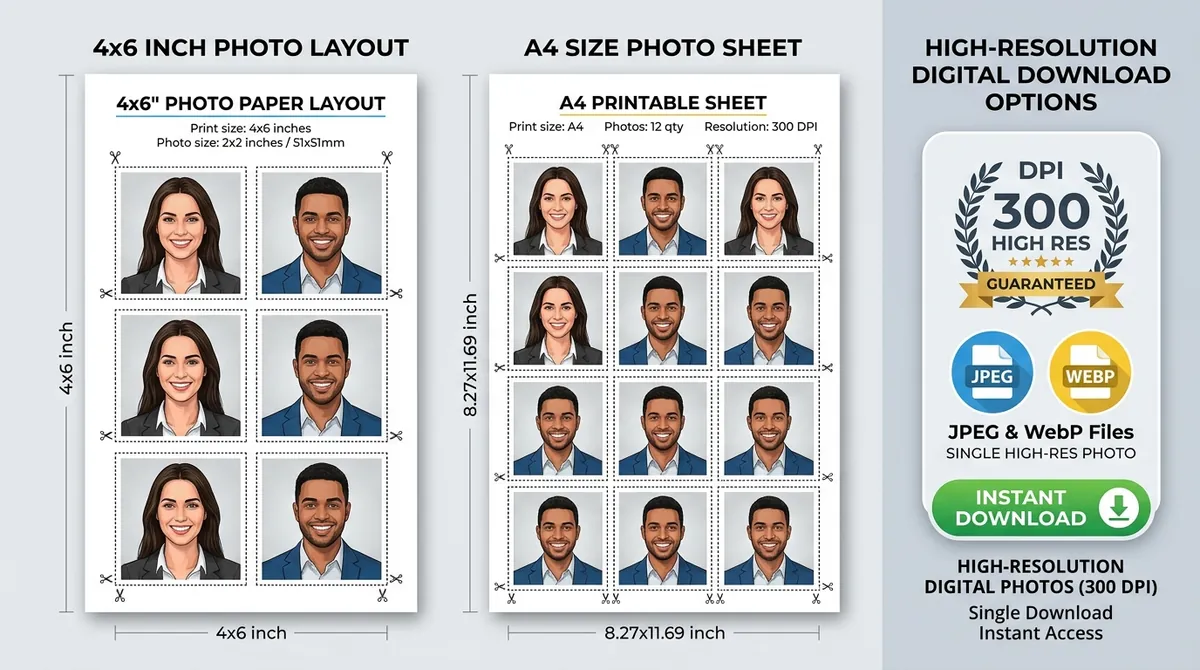
Figure 1: High-resolution digital download options — standard 4×6 inch photo paper grid (holds 6 photos) and A4 printable sheet with scissor cutting guides at guaranteed 300 DPI.
Why You Need Both Digital and Printable Photo Downloads
Depending on where you are submitting your identity documents, authorities demand different delivery formats:
-
Digital Form Submissions (Online Portals):
Modern government platforms—including Passport Seva Kendra online registration, the US Department of State DS-160 portal, SSC/UPSC recruitment portals, and Canadian e-visas—require a single digital image file. The file must meet precise dimensional ratios (such as 7:9 or 1:1) and strict file size envelopes (typically between 20 KB and 100 KB). Submitting a photo with incorrect pixel dimensions or an oversized file causes portal upload errors. -
Physical Counter Submissions (Hard Copies):
Offline visa appointments, Tatkaal verification dossiers, physical driving license applications, and school admissions require physical, trimmed photographic prints. Ordering a dedicated “passport photo package” from retail pharmacies or commercial photo studios costs between ₹150 to ₹300 ($15–$25 abroad) for just four to six prints. However, downloading a ready-to-print 4×6 inch grid sheet and having it printed as a standard photo snapshot costs less than ₹10 ($0.35).
Printable Sheet Specifications: 4×6 Inch vs A4 Paper
Our A4 & 4×6 Print Sheet Tool automatically arranges your cropped portrait onto standard paper sizes with calibrated margins and trim lines:
| Sheet Format | Sheet Dimensions | Photos per Sheet (35×45 mm) | Photos per Sheet (2×2 inch) | Best Use Case | Typical Print Cost |
|---|---|---|---|---|---|
| 4×6 Inch (10×15 cm) | 1200 × 1800 px (@ 300 DPI) | 6 Photos | 2 Photos | Local pharmacy kiosk, standard photo lab | ₹5 – ₹10 / $0.25 – $0.40 |
| 5×7 Inch (13×18 cm) | 1500 × 2100 px (@ 300 DPI) | 8 to 10 Photos | 4 Photos | Intermediate desk printers | ₹15 – ₹25 / $0.75 |
| A4 Sheet (210×297 mm) | 2480 × 3508 px (@ 300 DPI) | Up to 32 Photos | Up to 12 Photos | Family batches, school admissions, office ID | ₹20 – ₹40 / $1.00 |
The Importance of Hairline Cut Markers
When printing multiple photos on a single sheet, cutting individual photos with scissors or a paper trimmer can easily eat into the required biometric margins if no guides are provided. Our free download generator adds subtle, 0.5pt grey dotted hairline borders and corner crop marks so every cut yields an exact, millimeter-accurate 3.5×4.5 cm or 2×2 inch print.
Step-by-Step: How to Make and Download Your Free Passport Photo
Here is how to go from a raw phone snapshot to a downloadable, print-ready file in five easy steps:
Step 1: Capture Your Portrait
- Have someone stand 1.5 to 2 meters away and take a photo using your smartphone’s primary camera at eye level.
- Face a bright, natural light source (such as an open window). Keep your shoulders straight, expression neutral, and mouth closed.
Step 2: Load the Photo into the Online Maker
- Open the Passport Photo Maker in any browser (Safari, Chrome, Firefox, Edge).
- Click “Upload Image” to import your picture.
Step 3: Select Your Document Preset
- Choose India / UK / Europe (3.5 × 4.5 cm), US / OCI (2 × 2 inches), or any custom dimension.
- Align your face inside the interactive biometric guide. Ensure your head height fills 70% to 80% of the frame height.
- If your home wall has minor shadows, toggle the Passport Photo Background Change feature to replace it with pure consular white (
#FFFFFF).
Step 4: Choose Your Free Download Format
- For Online Portals: Click “Download Digital Photo”. Use the built-in quality slider or our Govt Exam Image Resizer to set the file weight to 20KB, 50KB, or 100KB.
- For Physical Prints: Click “Download 4×6 Print Sheet” or “Download A4 Sheet”. The system instantly compiles a high-density, 300 DPI grid template with cut guidelines.
Step 5: Save and Print
- The file downloads immediately to your computer or phone’s download folder.
- There are no watermarks, no registration screens, and no fees.
How to Print Your Downloaded 4×6 Sheet Correctly (Crucial Tips)
Printing your photo sheet improperly can alter physical dimensions and result in consular rejection. Follow these printing instructions carefully:
- Paper Quality: Always print on heavy glossy or semi-gloss photographic paper (200 to 250 GSM). Never use standard lightweight bond copy paper (75–80 GSM), as government scanners will reject it immediately.
- Scaling Setting (Crucial): In the printer dialog box, ensure the scale is set to “100%” or “Actual Size”. Never select “Fit to Printable Area” or “Shrink to Fit”, as these settings shrink the image by 3% to 6%, throwing off the exact 35×45 mm biometric measurements.
- Print Resolution: Set your printer quality to “High” or “Best Photo” (at least 300 DPI).
- Local Photo Kiosk Hack: If printing at a local kiosk (Walgreens, CVS, Boots, or a local photo lab), upload the 4×6 file as a standard snapshot print. Do not choose the kiosk’s built-in “passport photo” service, which charges up to 10× more for the exact same print.
5 Common Download and Printing Mistakes to Avoid
| Mistake | Consequence | How to Prevent It |
|---|---|---|
| Downloading low-res thumbnail | Blurry, pixelated print | Always use the high-res 300 DPI download option. |
| Selecting “Fit to Page” in printer | Photo shrinks below 3.5×4.5 cm | Select “100% / Actual Size” in your print dialog. |
| Using plain typing paper | Ink bleeds; paper gets rejected | Use 200+ GSM glossy photographic paper. |
| Cropping with dull scissors | Jagged, uneven edges | Use a sharp paper trimmer or steel ruler with a craft knife. |
| Uploading heavy files to portals | Portal rejects upload (>100KB) | Use our MB to KB Compressor before submission. |
Frequently Asked Questions (FAQ)
Can I download the passport photo on an iPhone or Android phone?
Yes. When you click download on iOS Safari, tap “Download” and the file saves directly to your Files or Photos app. On Android Chrome, the file saves instantly to your Downloads folder.
Does the free download include any watermarks?
No. All downloads generated through our Passport Photo Maker and A4 & 4×6 Print Sheet Tool are completely free of watermarks, branding stamps, or promotional text.
How do I print the downloaded 4×6 sheet at a store?
Transfer the downloaded 4×6 image file to a USB drive or keep it on your phone. Connect to the store’s photo printing kiosk, select standard 4×6 inch photo print, and collect your glossy print for under ₹10 ($0.35).
What DPI is the downloaded image?
All single photo and printable grid sheet downloads are generated at 300 DPI (Dots Per Inch), which is the international biometric imaging standard for crisp, artifact-free physical printing.
Last Updated: 04-10-2026 | Reviewed by Print Production & Identity Verification Standards Team
Try the Free Passport Photo Ratio Tool
Check dimensions, calculate pixels, and crop your photo instantly:
Passport Photo Ratio Calculator & Sizing Tool
Calculate exact simplified aspect ratios, millimeter to pixel conversions, and DPI resolutions.
Mandatory official format for Passport Seva Kendra (PSK) & Post Office Passport Seva Kendra (POPSK) applications.
35.0mm × 45.0mm (3.50 × 4.50 cm) simplifies to an exact aspect ratio of 7:9.