
Convert Photo to Passport Size Free Online: Biometric Standards, Dimensions & Step-by-Step Guide
फोटो को ऑनलाइन पासपोर्ट साइज में फ्री में कैसे बदलें - सम्पूर्ण गाइड
Quick Summary: How to Convert Photo to Passport Size Free Online
Direct Answer for Travelers & Applicants:
To convert photo to passport size free online, you do not need expensive software or commercial studio visits. You need:
- A clear, well-lit smartphone portrait taken from 1.5 to 2 meters away at eye level.
- The exact document dimension preset: 3.5×4.5 cm (7:9 aspect ratio) for India, UK, Europe, Australia, or 2×2 inches (1:1 ratio / 600×600 px) for the United States and OCI cards.
- Accurate facial framing where the head (from chin to top of hair) occupies 70% to 80% of the frame height according to international ICAO Doc 9303 biometric standards.
- A clean, uniform plain white background with zero shadows.
You can complete this entire conversion in under 90 seconds using our browser-based Passport Photo Maker and download both a single digital file and a ready-to-print 4×6 inch multi-photo sheet with zero cost and no watermarks.
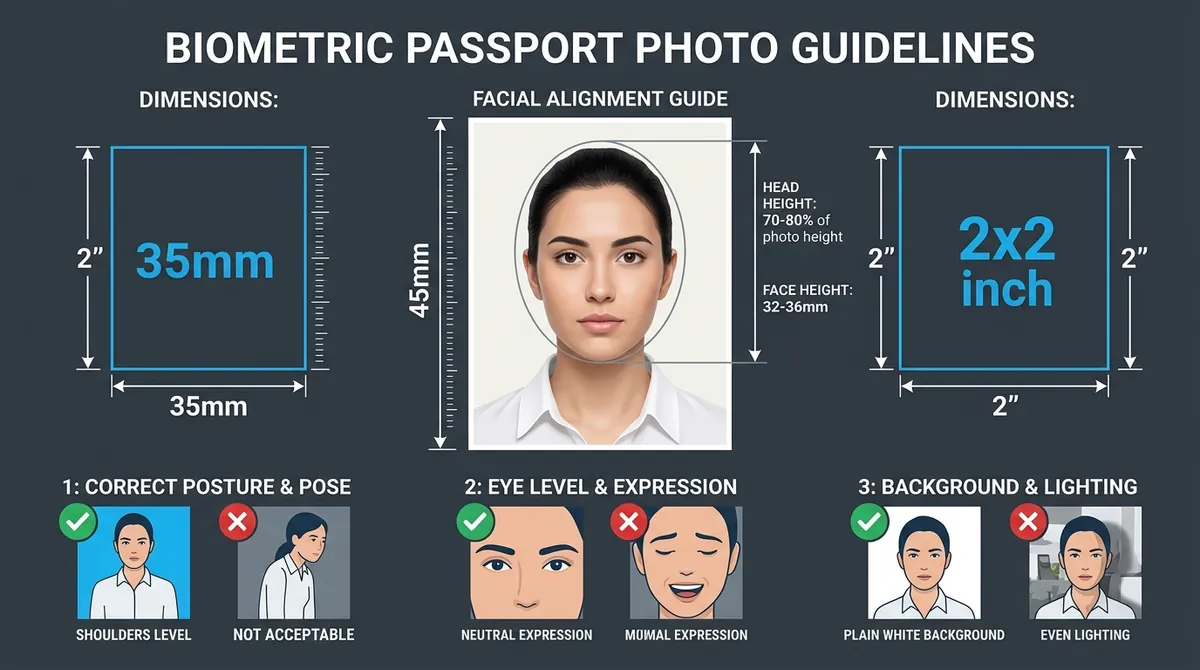
Figure 1: Official biometric guidelines for converting photos to passport size — covering facial alignment, 35×45 mm / 2×2 inch dimensions, posture, and lighting.
Why Converting Your Own Passport Photo at Home Makes Sense
Almost everyone has experienced the frustration of rushing to an offline photo studio before an urgent visa appointment or government job deadline. You wait in a crowded shop, sit under unflattering fluorescent tubes, pay anywhere from ₹150 to ₹300 ($15–$25 abroad) for six tiny prints, and often walk away with a stiff, overexposed print that might still fail embassy biometric validation.
With high-resolution smartphone cameras (12 MP to 50 MP) and modern web technology, taking control of your passport photo is not only cheaper—it delivers higher acceptance rates. When you convert your photo yourself:
- You control your appearance: Take multiple shots until you are completely satisfied with your posture, expression, and hair.
- You avoid middleman privacy risks: Our web-based tools process your images locally inside your browser canvas; your personal portraits are never stored or transmitted to remote servers.
- You save 90% on printing: Downloading a printable 4×6 inch grid containing 6 to 8 passport photos costs under ₹5 to ₹10 ($0.35) at any local pharmacy or color photo kiosk.
Official Passport Photo Dimensions Across Major Countries
Different countries enforce distinct biometric regulations. Cropping an image to an arbitrary rectangle without respecting the target country’s official aspect ratio is the leading reason online visa applications get rejected.
| Country / Document | Dimensions (Metric) | Dimensions (Inches) | Pixel Matrix (@ 300 DPI) | Aspect Ratio | Face Coverage |
|---|---|---|---|---|---|
| India (Passport, Aadhaar, DL) | 35 × 45 mm (3.5 × 4.5 cm) | 1.38 × 1.77 in | 413 × 531 px | 7:9 | 70% – 80% (25–35 mm) |
| United States (Passport & Visa) | 51 × 51 mm (5.1 × 5.1 cm) | 2.0 × 2.0 in | 600 × 600 px | 1:1 (Square) | 50% – 69% (25–35 mm) |
| United Kingdom (HMPO) | 35 × 45 mm (3.5 × 4.5 cm) | 1.38 × 1.77 in | 413 × 531 px | 7:9 | 70% – 80% (29–34 mm) |
| Schengen Visa (Europe) | 35 × 45 mm (3.5 × 4.5 cm) | 1.38 × 1.77 in | 413 × 531 px | 7:9 | 70% – 80% (32–36 mm) |
| Canada (Passport & PR) | 50 × 70 mm (5.0 × 7.0 cm) | 1.97 × 2.76 in | 591 × 827 px | 5:7 | 31–36 mm chin to crown |
| Australia (Passport) | 35 × 45 mm (3.5 × 4.5 cm) | 1.38 × 1.77 in | 413 × 531 px | 7:9 | 32–36 mm chin to crown |
| Singapore (ICA) | 35 × 45 mm (3.5 × 4.5 cm) | 1.38 × 1.77 in | 413 × 531 px | 7:9 | 70% – 80% |
| PAN Card (India - NSDL/UTI) | 25 × 35 mm (2.5 × 3.5 cm) | 0.98 × 1.38 in | 213 × 213 px (Portal) | 5:7 / 1:1 | 70% |
Need exact millimeter-level conversions? Check our detailed Passport Photo Dimensions Guide and interactive Ratio Calculator.
Step-by-Step: How to Convert Photo to Passport Size Free Online
Follow these five simple steps to turn any casual portrait into a certified passport photo in minutes.
Step 1: Capture the Raw Portrait Correctly
Do not use an existing selfie. Wide-angle front-facing cameras distort facial proportions by exaggerating the nose and receding the ears (known as barrel perspective distortion).
- Distance: Have a family member or friend hold the phone 1.5 to 2.0 meters (5 to 6 feet) away at your eye level.
- Lighting: Stand facing an open window during daylight hours. Diffuse, indirect sunlight provides balanced illumination on both cheeks, eliminating harsh shadows under the nose and chin.
- Background: Stand 0.5 meters (1.5 feet) away from a plain light wall so your body does not cast a dark silhouette on the wall.
- Expression & Posture: Keep your head straight, shoulders relaxed and square, both eyes wide open and level, mouth closed with a natural neutral expression (no wide grins or frowns).
Step 2: Upload to the Online Photo Maker
Visit the free Passport Photo Maker or Passport Size Photo Converter.
- Click “Upload Image” or drag and drop your photo (JPG, PNG, WebP up to 15 MB supported).
- Your image loads directly onto the interactive cropping canvas without watermarks.
Step 3: Choose Your Target Preset & Lock the Aspect Ratio
Select your target document from the preset menu:
- For Indian Passport, SSC, UPSC, and UK Visa: choose 3.5 × 4.5 cm (7:9 ratio).
- For US DS-160, Diversity Visa, and OCI: choose 2 × 2 inches (1:1 square).
- Our tool automatically locks the mathematical aspect ratio so your face is never stretched, squashed, or distorted.
Step 4: Position Face Inside the Biometric Oval Guide
A built-in biometric guide highlights the safe crown-to-chin zone:
- Use the Zoom Slider and drag tool to center your face inside the inner oval.
- Ensure the distance between the top of your hair and the bottom of your chin fills 70% to 80% of the frame height.
- Use the fine Rotation Slider if your camera was held slightly tilted to ensure your eye line is strictly horizontal.
Step 5: Clean Background & Export High-Resolution File
- If your home wall has minor texture, color casts, or faint shadows, use the Passport Photo Background Change feature to replace it with pure consular white (
#FFFFFF) or neutral light grey. - Need a small file size for government portals? Adjust the target file slider to compress to 20KB, 50KB, or 100KB using our Govt Exam Image Resizer.
- Click Download to get your high-resolution 300 DPI digital image, or generate a 4×6 inch multi-photo print sheet with cutting guidelines via our A4 & 4×6 Print Sheet Tool.
7 Critical Biometric Pitfalls That Trigger Passport Photo Rejection
Government passport processing centers utilize automated facial recognition software (AFRS) to scan every submitted photo. Here are the top seven reasons photos get rejected and how to avoid them:
- White Clothing on White Background: Wearing a pure white shirt blends your shoulders directly into the white background, confusing border control edge-detection algorithms. Always wear dark or contrasting clothing.
- Specular Glare on Eyeglasses: Even non-tinted prescription spectacles frequently reflect camera flash or room lights. Many embassies (including the US and India) now explicitly prohibit glasses in official photos. Remove them before shooting.
- Covered Ears and Eyebrows: While religious head coverings (turbans, hijabs) are permitted, your entire face from the tip of the chin to the top of the forehead and both facial margins must be clearly visible. Hair must be tucked behind ears.
- Harsh Overhead Shadows: Indoor ceiling lights create dark pockets under your eye sockets and nose. Always use front-facing diffused light.
- Blurry or Low-Resolution Images: Do not capture screenshots of old photos or crop tiny faces from group photos. The exported image must be crisp with a minimum resolution of 300 DPI.
- Mouth Open or Exaggerated Smile: Teeth must not be visible. Keep your lips gently closed in a relaxed, neutral posture.
- Incorrect Physical Aspect Ratio: Manually resizing an image by dragging corner handles in generic word processors skews the aspect ratio, invalidating the biometric proportions.
Printing Your Passport Photos for Pennies
Once you have downloaded your free passport photo from our tool:
- Generate a 4×6 inch (10×15 cm) print layout, which fits 6 standard 35×45 mm photos or 2 standard 2×2 inch photos with safety cut borders.
- Save the image to a USB flash drive or your smartphone.
- Visit any local photo lab, pharmacy (Walgreens, CVS, Boots), or instant kiosk (such as Kodak or Fujifilm photo centers).
- Request a standard 4×6 inch glossy photographic print (do not select “passport photo service” at the kiosk, as they will charge extra; simply print it as a standard 4×6 snapshot).
- Cut the individual photos using a ruler and sharp craft knife along the printed hairline guides.
Frequently Asked Questions (FAQ)
Can I convert a photo to passport size on my mobile phone?
Yes. Our web tools are fully responsive and work seamlessly in Safari on iOS and Chrome on Android without installing third-party apps. Simply take a portrait, open Passport Photo Maker, and download your photo directly to your camera roll.
Is it completely free, or will I be asked to pay at the end?
Our passport photo converter and maker is 100% free with no watermarks, no mandatory email registrations, and no hidden subscriptions.
What is the exact aspect ratio for a standard passport photo?
For most countries following ICAO standards (India, UK, Australia, Europe), the aspect ratio is 7:9 (35 mm width to 45 mm height). For the United States, Philippines, and OCI cards, the aspect ratio is 1:1 (square, 2×2 inches).
Can I use a selfie to make a passport size photo?
Consular authorities strongly advise against selfies because front phone lenses distort facial depth (making the nose appear larger and pushing ears out of frame). Always ask someone else to capture your portrait from 1.5 to 2 meters away using the rear camera.
Last Updated: 01-10-2026 | Reviewed by Biometric Identity & Passport Verification Standards Team
Try the Free Passport Photo Ratio Tool
Check dimensions, calculate pixels, and crop your photo instantly:
Passport Photo Ratio Calculator & Sizing Tool
Calculate exact simplified aspect ratios, millimeter to pixel conversions, and DPI resolutions.
Mandatory official format for Passport Seva Kendra (PSK) & Post Office Passport Seva Kendra (POPSK) applications.
35.0mm × 45.0mm (3.50 × 4.50 cm) simplifies to an exact aspect ratio of 7:9.