
Convert Photo to Indian Passport Size Online Free: 3.5×4.5 cm Specs, Passport Seva Rules & Guide
भारतीय पासपोर्ट साइज फोटो ऑनलाइन फ्री में कैसे बनाएं (3.5×4.5 सेमी नियम)
Quick Summary: Official Indian Passport Photo Specifications
Direct Answer for Indian Passport Applicants:
To convert photo to Indian passport size online free for Passport Seva Kendra (PSK), Post Office Passport Seva Kendra (POPSK), or Indian Embassy / VFS Global submissions, your photo must adhere to the Ministry of External Affairs (MEA) biometric mandate:
- Physical Size: 35 mm × 45 mm (3.5 cm × 4.5 cm).
- Aspect Ratio: 7:9 locked vertical portrait.
- Digital Resolution: 413 × 531 pixels minimum at 300 DPI (print-ready).
- Face Height (Chin to Crown): Must occupy 70% to 80% of the vertical frame height (25 mm to 35 mm).
- Background: Pure plain white with zero shadows or patterns.
- Online Portal File Size: 10 KB to 300 KB in JPEG/JPG format.
You can format, crop, clean the background, and verify your picture using our specialized Passport Size Photo in CM tool and Passport Photo Maker without any subscription or watermarks.
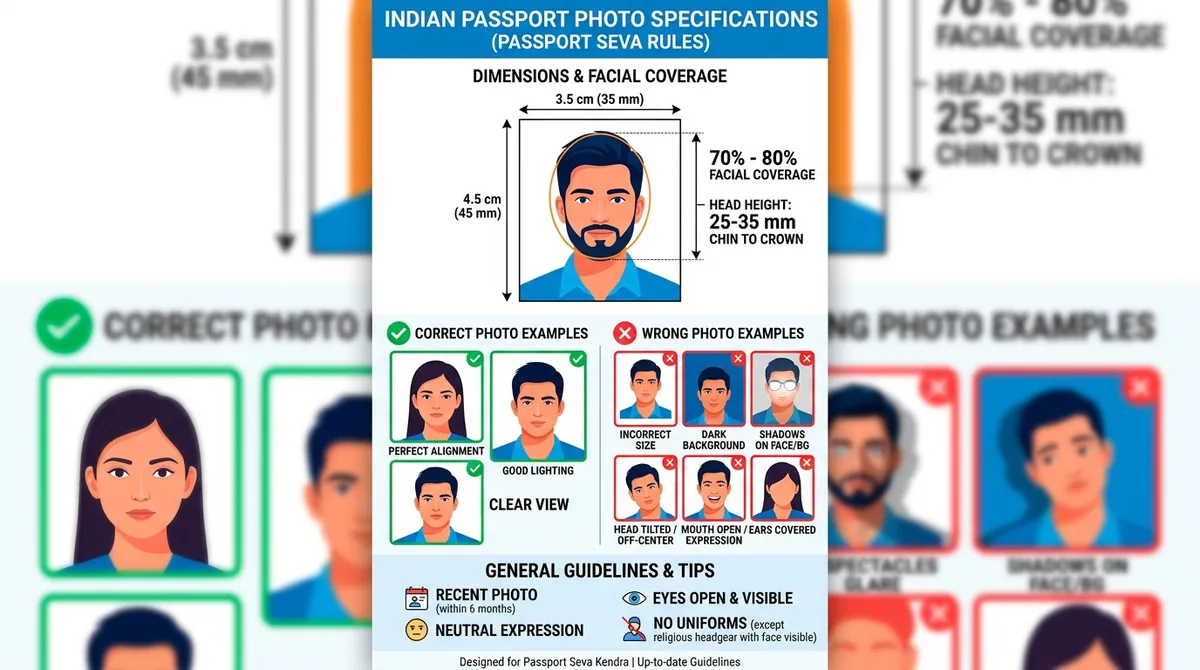
Figure 1: Official Indian passport photo dimensions, facial coverage (70–80%), correct alignment, and common errors to avoid under Passport Seva Kendra guidelines.
The Reality of Getting Passport Photos for Indian Applications
Whether applying for a fresh passport, reissue, Tatkaal application, or an Overseas Citizenship of India (OCI) card, improper photographs remain the number one cause of document hold-ups at the Passport Seva Kendra (PSK) counter.
While PSK centers have on-site biometric capture booths for adult applicants, passport photographs are still strictly required for:
- All minor children and infants under 4 years old (who cannot sit steadily in front of the counter camera).
- Online form upload during the Passport Seva portal submission or NRI / VFS Global portal appointment booking.
- Tatkaal passport verification dossiers, Police Clearance Certificates (PCC), and Indian Visa / OCI documentation.
Commercial photo studios in India often charge ₹100 to ₹250 for urgent passport photos, yet many neighborhood shops fail to adhere to the strict 70%–80% facial ratio or use outdated bluish or greyish backdrops that trigger immediate rejection. Formatting your own photo online gives you complete confidence before your appointment.
Indian Identity Documents Photo Matrix (Quick Comparison)
Different Indian government portals enforce varying dimension ratios. Use this quick reference matrix:
| Document / Portal | Metric Dimensions | Pixel Dimensions (@ 300 DPI) | Aspect Ratio | Background Color | File Weight Limit |
|---|---|---|---|---|---|
| Indian Passport (PSK/POPSK) | 3.5 × 4.5 cm (35 × 45 mm) | 413 × 531 px | 7:9 | Pure White | 10 KB – 300 KB |
| OCI Card (Overseas Indian) | 5.1 × 5.1 cm (2 × 2 inches) | 600 × 600 px | 1:1 | Pure White | 20 KB – 500 KB |
| Aadhaar Card Update (UIDAI) | 3.5 × 4.5 cm | 413 × 531 px | 7:9 | Plain White / Light | Max 2 MB (PDF/JPG) |
| PAN Card Form 49A (NSDL/UTI) | 2.5 × 3.5 cm | 213 × 213 px (Portal) | 5:7 / 1:1 | White or Light | Max 50 KB |
| Driving Licence (Sarathi Parivahan) | 3.5 × 4.5 cm | 420 × 525 px | 7:9 | Plain White | 10 KB – 20 KB |
| SSC / UPSC Exam Forms | 3.5 × 4.5 cm | 350 × 450 px | 7:9 | Light / White | 20 KB – 50 KB |
For PAN or Aadhaar card specifics, see our dedicated guides on Aadhaar Photo Size and PAN Card Photo Size.
Detailed Passport Seva Photo Guidelines (Rules You Must Follow)
The Ministry of External Affairs has aligned its photographic requirements with international ICAO Doc 9303 standards. Here are the core specifications:
1. Facial Coverage & Head Measurements
- The distance from the bottom of your chin to the top of your hair (crown) must measure between 25 mm and 35 mm.
- This translates to 70% to 80% of the entire frame height.
- Your face must be centrally positioned, looking straight at the camera. Both sides of your face must be equally lit without shadow.
2. Pure White Background
- The background must be clean, flat, and uniformly white.
- No off-white, light blue, cream, patterned wallpaper, or outdoor garden backdrops are acceptable.
- Ensure there are no shadows cast by your ears, head, or shoulders onto the wall behind you. If needed, use our Passport Photo Background Change tool to instantly clean the backdrop to studio white (
#FFFFFF).
3. Eyes, Glasses & Facial Expressions
- Both eyes must be fully open, sharp, and clearly visible without red-eye reflection.
- Eyeglasses Warning: Consular guidelines strongly recommend taking off spectacles. If worn, frames must not cover any portion of the eyes, and there must be zero glare or flash reflection on the glass lenses. Sunglasses or tinted glasses are strictly prohibited.
- Maintain a completely neutral facial expression with your mouth closed and teeth concealed.
4. Cultural & Religious Attire (Turbans, Hijabs, Bindis)
- Religious headgear (such as Sikh turbans or Muslim hijabs) is officially permitted by the MEA.
- However, the head covering must not obscure any facial features: your forehead hairline down to the chin tip and both cheek contours must remain visible.
- Tilak, bindi, and minor traditional facial marks are permitted provided they do not obscure biometric contours.
- Avoid wearing white clothing, as it blends into the white background; opt for dark, solid-colored shirts or tops.
5. Infant & Baby Passport Photos
Capturing photos of babies and toddlers under 4 years old requires special care:
- Lay the infant flat on a clean white sheet or bedspread, ensuring no wrinkles.
- Take the photo from directly above while the child looks toward the ceiling.
- The child’s eyes should preferably be open, with the mouth closed.
- No other person (including parental supporting hands, toys, or feeding bottles) should appear in the frame.
How to Convert Photo to Indian Passport Size Online Free (5-Minute Guide)
Converting your existing photo to full Indian PSK compliance takes just a few steps:
Step 1: Capture a High-Quality Portrait
- Have someone stand 1.5 to 2 meters away from you holding a smartphone camera at eye level.
- Face a brightly lit window to enjoy soft, diffused light across both sides of your face.
- Keep your shoulders straight, chin level, and look straight into the lens.
Step 2: Open the Indian Passport Photo Maker
Navigate to our Passport Size Photo in CM or Passport Photo Maker.
- Upload your captured portrait.
- Select the “Indian Passport / 3.5×4.5 cm (7:9)” preset. The cropping window locks to the official 7:9 biometric proportion.
Step 3: Align Facial Contours to the 70%–80% Guide
- Drag and adjust the zoom slider so your head fits comfortably inside the designated biometric oval.
- Ensure your chin aligns with the lower marker and the top of your hair touches the upper guide boundary.
- If your photo was slightly tilted, use the rotation slider to level your eye axis horizontally.
Step 4: Clean the Background to Pure White
- If your home wall has minor texture or slight shadows, toggle the background cleaner.
- The tool isolates your portrait and substitutes a pure consular white (
#FFFFFF) background while preserving fine hair details and clothing edges.
Step 5: Adjust File Size for the Online Portal & Download
- For the Passport Seva portal upload (which requires files between 10 KB and 300 KB), adjust the quality slider to export an optimized 40 KB – 80 KB JPEG.
- Download your digital photo immediately.
- Want hard copies for your appointment file? Use our A4 & 4×6 Print Sheet Generator to produce a 4×6 inch sheet containing 6 ready-to-cut Indian passport photos for under ₹10 at any local photo printer.
Frequently Asked Questions (FAQ)
What is the exact size of an Indian passport size photo in cm and inches?
The official dimensions are 3.5 cm wide by 4.5 cm high (35 mm × 45 mm), which equals 1.38 inches × 1.77 inches. The digital pixel resolution at 300 DPI is 413 × 531 pixels.
What should I wear for an Indian passport photo?
Wear solid, dark-colored clothing (navy blue, dark grey, black, or deep green) with a collar or crew neck. Do not wear white or light cream shirts, as they blend into the compulsory white background and cause edge rejection.
Can I wear spectacles or eyeglasses in my Indian passport photo?
While technically permitted if the frames are thin and lenses have zero glare, Passport Seva Kendras strongly advise removing glasses to avoid any possibility of rejection. If your application is rejected due to spectacle glare, you will be forced to reschedule your appointment.
How much face coverage is required for Indian passport photos?
The face (measured from the tip of the chin to the top of the hair) must occupy 70% to 80% of the total vertical height of the photograph (between 25 mm and 35 mm).
Can I resize the image file under 100 KB for Passport Seva online upload?
Yes. Use our Govt Exam Image Resizer or MB to KB Compressor to reduce any heavy image down to 20KB, 50KB, or 100KB while preserving crisp 300 DPI clarity.
Last Updated: 02-10-2026 | Compliant with Ministry of External Affairs (MEA) & Passport Seva Kendra Biometric Standards
Try the Free Passport Photo Ratio Tool
Check dimensions, calculate pixels, and crop your photo instantly:
Passport Photo Ratio Calculator & Sizing Tool
Calculate exact simplified aspect ratios, millimeter to pixel conversions, and DPI resolutions.
Mandatory official format for Passport Seva Kendra (PSK) & Post Office Passport Seva Kendra (POPSK) applications.
35.0mm × 45.0mm (3.50 × 4.50 cm) simplifies to an exact aspect ratio of 7:9.