
Best Free Online Passport Photo Maker (2026 Comparison, Features & Review)
सर्वश्रेष्ठ फ्री ऑनलाइन पासपोर्ट फोटो मेकर टूल्स की तुलना और गाइड
Quick Summary: What Makes the Best Free Online Passport Photo Maker?
Direct Answer for Searchers & Applicants:
The best free online passport photo maker in 2026 is one that combines three uncompromising pillars:
- True Zero Cost with No Watermarks: It does not trap your time by letting you crop a photo only to demand a credit card, email signup, or stamp an ugly watermark over your portrait at the download screen.
- Client-Side Biometric Privacy: It runs locally inside your browser via HTML5 Canvas and WebAssembly. Your sensitive biometric facial images are never uploaded or stored on external cloud servers, eliminating privacy breaches.
- Precision Presets & Print Sheets: It provides official ICAO Doc 9303 presets (3.5×4.5 cm / 7:9 ratio for India, UK, and Schengen; 2×2 inch / 1:1 ratio for the US and OCI), instant background cleaning to pure white, and single-click generation of printable 4×6 inch and A4 multi-photo sheets with cut guidelines.
Our built-in Passport Photo Maker delivers all these capabilities entirely free directly in your web browser.
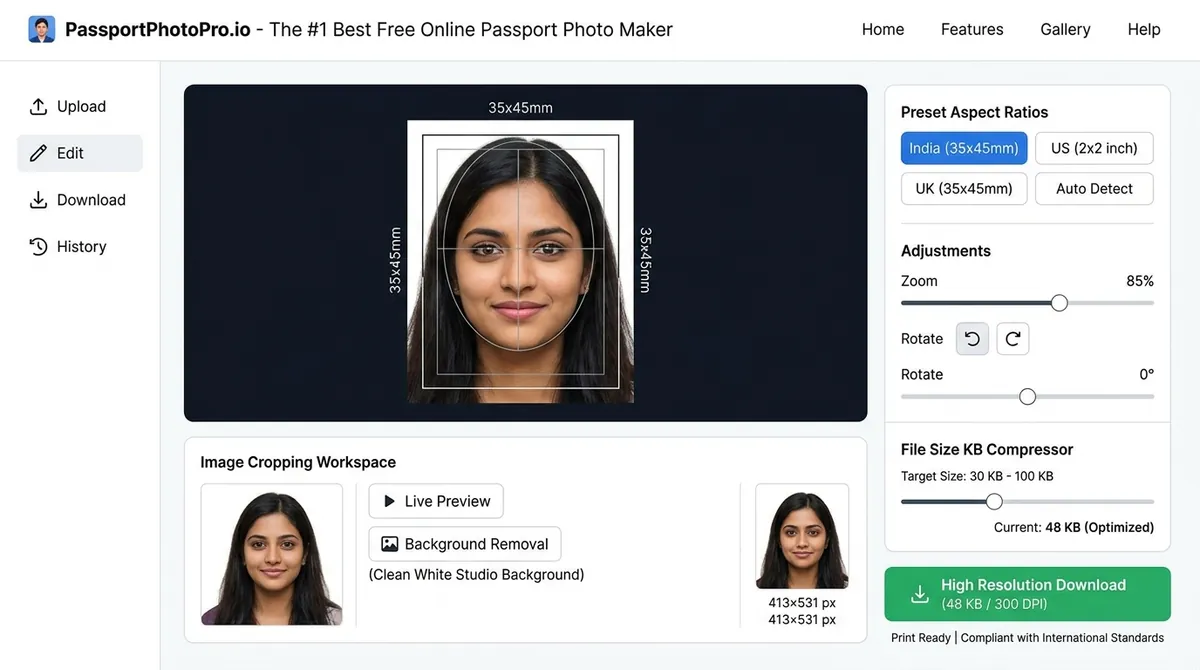
Figure 1: Anatomy of a modern, compliant online passport photo maker — featuring interactive biometric face zones, aspect ratio locking, background cleaning, and file size compressor.
The Landscape: Beware the “Free” Passport Photo Bait-and-Switch
If you search online for passport photo software, you will encounter dozens of commercial mobile apps and websites advertising themselves as “100% Free Passport Photo Makers.” Unfortunately, 90% of them employ deceptive practices:
- The Watermark Trap: They allow you to upload, crop, and adjust your photo. However, when you click “Download,” a massive logo is stamped across your face, demanding a $7 to $15 fee to remove it.
- Mandatory Subscription Signups: Other tools force you to enter your credit card for a “7-day free trial,” automatically billing recurring monthly charges if you forget to cancel.
- Biometric Data Harvesting: Many free mobile apps upload your unencrypted facial portraits to foreign servers to train commercial AI facial recognition models or sell profile data to third-party ad networks.
- Incorrect Ratios: Generic image crop tools let you select random rectangles without locking the strict mathematical 7:9 or 1:1 biometric aspect ratios required by immigration portals.
Our free tools—including the Passport Photo Maker, Passport Size Photo Converter, and Ratio Calculator—were built specifically to eliminate these practices and provide a genuinely transparent, free alternative.
Comparison Matrix: Free In-Browser Tool vs Competitors
Here is how our client-side platform compares against paid mobile apps, commercial pharmacy studios, and general graphic design tools:
| Feature / Criteria | In-Browser Photo Maker (Our Tool) | Paid Mobile Photo Apps | Pharmacy / Retail Studio (CVS/Walgreens/Local) | Generic Editors (Canva / Photoshop) |
|---|---|---|---|---|
| Cost | 100% Free Forever | ₹400 – ₹1,200 ($5 – $15) | ₹150 – ₹300 / $16 – $22 | Free tier / Paid subscription |
| Watermarks | Zero Watermarks | Yes (Free versions) | None | None |
| Biometric Privacy | 100% Client-Side (No Uploads) | High risk (Server storage) | Medium (Stored on lab PC) | Cloud-saved to your account |
| Biometric Guides | Interactive Oval Face Zone | Automated / Semi-automated | Operator eyeball estimation | Manual ruler / guide creation |
| Aspect Ratio Presets | 35×45mm, 2×2”, 50×70mm, etc. | Limited presets | Country specific | Must calculate manually |
| Background Cleaner | Built-in Pure White (#FFFFFF) |
Often behind paywall | Physical pull-down screen | Manual background erasure |
| File Size Compressor | Integrated (20KB, 50KB, 100KB) | Rare / Not included | Digital copies cost extra | Requires separate export steps |
| 4×6 Printable Sheet | Yes (Instant Download) | Behind paywall ($4.99+) | Will NOT print 4x6 grid | Manual tiling required |
Essential Features to Look for in a Passport Photo Maker
When choosing a photo maker for official documentation, ensure the software incorporates these core technical features:
1. Mathematical Aspect Ratio Locking
Biometric verification systems measure the distance between facial landmarks (interpupillary distance, chin-to-eye vertical spacing, forehead-to-chin ratio). A proper photo maker must strictly lock the aspect ratio:
- 7:9 Ratio: 35 mm width to 45 mm height (Indian Passport, UK, Australia, Schengen, New Zealand, Singapore).
- 1:1 Ratio: 51 mm × 51 mm or 600 × 600 px (US Visa, DS-160, Diversity Visa, OCI Card).
- 5:7 Ratio: 50 mm × 70 mm (Canadian Passport and Permanent Residency).
2. Live Biometric Face Zone Overlay
A visual template indicating the crown line (top of hair), chin line, and central vertical symmetry axis is critical. You must be able to zoom and position your portrait so your head height fills 70% to 80% of the frame height (or 50% to 69% for US standards).
3. Client-Side Browser Privacy
Photos of your face constitute sensitive biometric identity data. The best tools process pixel data directly inside your browser memory using HTML5 Canvas APIs. You should never be required to create an account or transmit raw images to an unknown server.
4. Direct Background Replacement
Consular authorities reject photos with wall shadows, off-white hues, or domestic backgrounds. The tool should offer a clean background replacement to pure consular white (#FFFFFF) without degrading hair strands or blurring the edges of your shoulders.
5. Integrated KB File Compressor
Government job recruitment portals (SSC, UPSC, State PSCs) and passport application websites enforce strict file upload size caps (often 20 KB to 50 KB). An elite passport photo maker includes an integrated slider allowing you to specify target kilobytes without requiring third-party compression tools.
How to Make a Compliant Passport Photo in 90 Seconds
Here is the fast, foolproof workflow:
- Capture: Stand 1.5 meters away from a plain wall facing an open window for bright, natural daylight. Have someone take a portrait with a smartphone at eye level.
- Upload: Open the Passport Photo Maker and load your image.
- Select Preset: Choose your country’s standard (e.g., India 35×45 mm or US 2×2 inch).
- Align: Adjust the zoom and drag the photo so your eyes sit level and your face fills the biometric oval guide.
- Clean & Download: Toggle the white background cleaner if needed. Select your desired file format (single digital JPEG for online submission or a printable 4×6 inch multi-photo sheet via our A4 & 4×6 Print Sheet Tool).
- Print: Print the 4×6 inch layout at any neighborhood photo kiosk or pharmacy for pennies.
Real-World Cost Savings (The Numbers Don’t Lie)
Consider a family of four renewing passports or applying for visas:
- Traditional Studio or Pharmacy: 4 people × ₹250 (or $18 in the US/UK) = ₹1,000 / $72.
- DIY with Our Free Tool:
- Photo creation: ₹0 / $0.
- One 4×6 inch photographic print holding all family photos: ₹5 to ₹10 / $0.35.
- Total Savings: Over 95%, accompanied by better photos taken in the comfort of your home.
Frequently Asked Questions (FAQ)
Which free passport photo maker is completely free without watermarks?
Our Passport Photo Maker is completely free, does not insert watermarks, requires no account creation, and allows unlimited single photo and 4×6 grid downloads.
Can I use Photoshop or Canva instead of a dedicated passport photo maker?
While you can theoretically use Photoshop or Canva, doing so requires manually calculating millimeters to pixels at 300 DPI, drawing aspect ratio boxes, measuring facial percentages, and tiling print grids manually. A dedicated maker automates all these biometric calculations in seconds.
Will photos created with an online maker be accepted by embassies?
Yes, provided you adhere to official consular rules: neutral facial expression, even lighting, plain white background, and correct 70%–80% face coverage. Embassies evaluate physical specifications, not which software generated the print.
How do I compress my passport photo for government portals?
Use our integrated Govt Exam Image Resizer or MB to KB Compressor to resize your photo to exact 20KB, 50KB, or 100KB requirements with one click.
Last Updated: 03-10-2026 | Evaluated and Maintained by Identity Imaging & Web Standards Editors
Try the Free Passport Photo Ratio Tool
Check dimensions, calculate pixels, and crop your photo instantly:
Passport Photo Ratio Calculator & Sizing Tool
Calculate exact simplified aspect ratios, millimeter to pixel conversions, and DPI resolutions.
Mandatory official format for Passport Seva Kendra (PSK) & Post Office Passport Seva Kendra (POPSK) applications.
35.0mm × 45.0mm (3.50 × 4.50 cm) simplifies to an exact aspect ratio of 7:9.